


This download is no longer available. This could be due to the program being discontinued, having a security issue or for some other reason.

You can download these alternatives

Comprehensive Photo Management with Windows Live Photo Gallery 2012

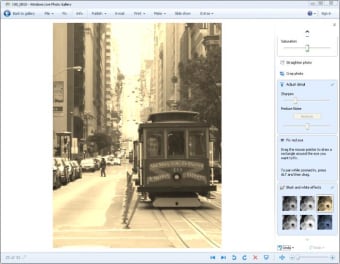
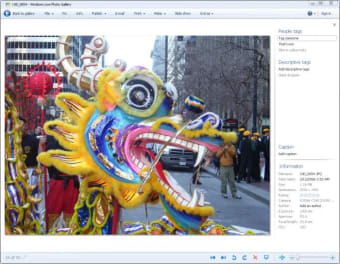
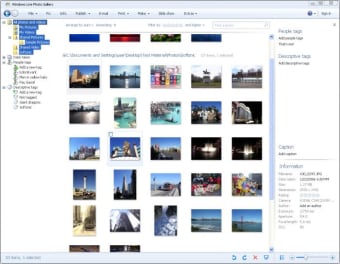
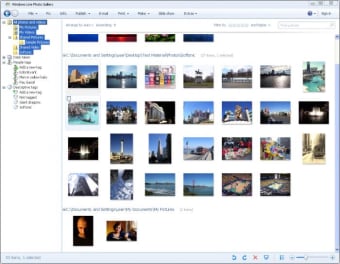
Windows Live Photo Gallery 2012 is a free multimedia application designed for Windows users, offering a robust platform for managing and editing photos and videos. This software allows users to organize their media files efficiently, providing features such as tagging, rating, and searching for images based on various criteria. It also includes basic editing tools to enhance photos, enabling users to crop, adjust colors, and apply effects with ease.

Top Recommended Alternative

In addition to its organizational capabilities, Windows Live Photo Gallery 2012 supports sharing options that integrate seamlessly with social media platforms. Users can create albums, slideshows, and even movies from their photo collections, enhancing the multimedia experience. The intuitive interface ensures that both novice and experienced users can navigate the program effortlessly, making it a reliable choice for anyone looking to manage their digital photos.

 0/5

App specs

  • License

    Free

  • Version

    16.4.3528.331
  • Latest update

  • Platform

    Windows

  • OS

    Windows 7

  • Language

    English

    Available languages

    • German
    • English
    • Spanish
    • French
    • Italian
    • Portuguese
  • Downloads

    985.5K

  • Size

    1.24 MB

  • Developer

Program available in other languages


This download is no longer available. This could be due to the program being discontinued, having a security issue or for some other reason.

You can download these alternatives


User reviews about Windows Live Photo Gallery 2012

3.3

14 reviews

Add review

Main reviews for you

  • Anonymous user

    Not great. I don't understand why they give good reviews to this Windows Photo Gallery when it can't even do the basic of the basics, ie: flip a photo!! So many useful features which they were in Picture Manager have disappeared here, apart from some basic filters, the other features are pretty useless - Facebook, YouTube, tags etc....How come Windows Word have more Picture editing options than Photo Gallery!!! Please Microsoft sort it out! Pros: Basic filters Cons: Can't flip photosCan't SAVE AS, need to Make a Copy and then click several times to Revert to OriginalMicrosoft Word has more pictures tools, these should transferred to PhotoGalleryCan't see all the pictures in thumbnails, as used to see in Picture Manager

  • Anonymous user

    Windows live photo gallery. I hate it - it is difficult to sort my photos and sometimes you can't find tem - I wish I could go back to XP and photo app... was user friendly - not anymore.... ugh Pros: nothing Cons: I don't like the way they sort photos - when on vacation i take a lot of photos - i want them all in one place - i will sort them myself

  • Anonymous user

    CAN MY PRESENT VERSION OF WINDOWS PHOTO GALLERY PICTURES BE TRANSPORTED. Some of the controls is missing in my windows photo gallery. If I download a new version, will my photo's be transferred in to it? Cons: The whole set of controls above my photos are missing in this present gallery. If I download a newer version, will photos be automaticially be transferred

  • Anonymous user

    Not easy. Can NOT believe you cant crop, or edit photos easily anymore. Now you have to take extra and annoying steps! Pros: NONE Cons: No more red eye fix, or crop right from photo screen, HORRIBLE!

  • Anonymous user

    Exasperating Program!. WLPG has punishing limitations that require tolerance and a comprehensive understanding of its weaknesses; however WLPG is straightforward in its design and approach making it user friendly overall. The program is really designed for those that are willing to accept the inherent flaws built into the system! Scrolling through multiple photos within a file is sluggish and occasionally unresponsive. WLPG spontaneously deletes photos unchecked for this process making retrieval difficult at times. The photo editing built into WLPG is very rudimentary and not worth the effort.Taking into consideration that WLPG is a free program that should be all one needs to know to make an informed decision. I use WLPG as a staging area for file transfers to alternative software programs and as a basic backup to those files. Pros: None Cons: Program needs restructuring.

  • Anonymous user

    New Windows Photo Gallery. I too am very frustrated with the new versions. Vista was much simpler with far fewer steps. I'm so glad I kept Vista on my desktop. Pros: None Cons: Everything

More

You may also like

Alternatives to Windows Live Photo Gallery 2012

Explore Apps

Latest articles

Laws concerning the use of this software vary from country to country. We do not encourage or condone the use of this program if it is in violation of these laws.